
| Subjective form | Objective form | Possessive form |
|---|---|---|
| He | Him | His |
| She | Her | Hers |
| They | Them | Theirs |
| It | It | Its |
| Neopronouns† | — | Leave blank |
| Any pronouns† | — | — |
| Ask† | — | — |
| Questioning† | — | — |
| None† | — | — |
More actions
No edit summary Tag: 2017 source edit |
|||
| Line 12: | Line 12: | ||
'''Prism Bio''', or simply '''Bio''', is a custom-made player biography plugin used across the entire {{SITENAME}} Network. Prism Bio allows players to optionally set their pronouns, gender identity, orientation, and approximate age range from a list of options. These selections are then shown in server chat when hovering over the player's username, or through the {{CMD|viewbio}} command in-game, allowing other players to quickly and easily address each other. | '''Prism Bio''', or simply '''Bio''', is a custom-made player biography plugin used across the entire {{SITENAME}} Network. Prism Bio allows players to optionally set their pronouns, gender identity, orientation, and approximate age range from a list of options. These selections are then shown in server chat when hovering over the player's username, or through the {{CMD|viewbio}} command in-game, allowing other players to quickly and easily address each other. | ||
Unlike previous | Unlike previous bio plugins, Prism Bio allows users to select multiple pronouns and orientations rather than limiting players to single, per-defined, options. As a custom plugin, Prism Bio is regularly updated to include new options per request. | ||
There are no [[Level|Levels]] or [[Ranks|Rank]] requirements to setting a bio; All players on {{SITENAME}} are able to set their bio at any time without restriction. Prism Bio can be accessed directly via its built-in command, or by using {{CMD|guide}}. | There are no [[Level|Levels]] or [[Ranks|Rank]] requirements to setting a bio; All players on {{SITENAME}} are able to set their bio at any time without restriction. Prism Bio can be accessed directly via its built-in command, or by using {{CMD|guide}}. | ||
| Line 39: | Line 39: | ||
== Bio contents == | == Bio contents == | ||
Some bio categories, chiefly pronouns and orientation, allow users to select multiple options to further represent their identity. Not all options on the first pages of these categories allow users to continue selecting further items and, if chosen, will return the user to the main menu early. Options that do not allow for multiple selection will be marked with a dagger (†). | |||
{| class="wikitable" | <tabber> | ||
! | |-| Pronouns = | ||
! | {| class="wikitable" style="width: 100%;" | ||
!Subjective form!!Objective form!!Possessive form | |||
|- | |- | ||
|He | |He | ||
|Him | |||
|His | |His | ||
|- | |- | ||
| Line 56: | Line 58: | ||
|- | |- | ||
|It | |It | ||
|It | |It | ||
|Its | |Its | ||
|- | |- | ||
| | |Neopronouns† | ||
|— | |— | ||
|Leave | |{{#inline-tooltip:Leave blank|If selected, a third pronoun will not be displayed on your bio profile.}} | ||
|- | |- | ||
|Any | |Any pronouns† | ||
|— | |— | ||
|— | |— | ||
|- | |- | ||
| | |Ask† | ||
|— | |— | ||
|— | |— | ||
|- | |||
|Questioning† | |||
|— | |||
|— | |||
|- | |||
|None† | |||
|— | |||
|— | |||
|} | |||
|-| Gender = | |||
{| class="wikitable" style="width: 100%;" | |||
!Gender | |||
|- | |||
|Male | |||
|- | |||
|Female | |||
|- | |||
|Trans Male | |||
|- | |||
|Trans Female | |||
|- | |||
|Demiboy | |||
|- | |||
|Demigirl | |||
|- | |||
|Demigender | |||
|- | |||
|Genderfluid | |||
|- | |||
|Genderqueer | |||
|- | |||
|Agender | |||
|- | |||
|Nonbinary | |||
|- | |||
|Intersex | |||
|- | |||
|Two Spirit | |||
|- | |||
|Unlabeled | |||
|- | |- | ||
|Questioning | |Questioning | ||
|} | |||
|-| Orientation = | |||
{| class="wikitable" style="width: 100%;" | |||
!Orientation!!Romantic | |||
|- | |||
|Gay† | |||
| Homoromantic | |||
|- | |||
|Lesbian† | |||
|Heteroromantic | |||
|- | |||
|Bisexual | |||
|Biromantic | |||
|- | |||
|Pansexual | |||
|Panromantic | |||
|- | |||
|Asexual | |||
|Demiromantic | |||
|- | |||
|Demisexual | |||
|Aromantic | |||
|- | |||
|Queer | |||
|{{#inline-tooltip:Leave blank|If selected, a romantic attraction will not be displayed on your bio profile.}} | |||
|- | |||
|Straight† | |||
|— | |||
|- | |||
|Polyamorous | |||
|— | |||
|- | |||
|Unlabeled† | |||
|— | |— | ||
|- | |||
|Questioning† | |||
|— | |— | ||
|} | |||
|-| Age range = | |||
{| class="wikitable" style="width: 100%;" | |||
!Age range | |||
|- | |- | ||
| | |Minor | ||
| | |- | ||
| | |18-20 | ||
|- | |||
|21-23 | |||
|- | |||
|24-26 | |||
|- | |||
|27-29 | |||
|- | |||
|30-32 | |||
|- | |||
|33-35 | |||
|- | |||
|37-39 | |||
|- | |||
|40+ | |||
|} | |} | ||
</tabber> | |||
== Notes== | |||
* If a player has their Discord account linked with the server, the Bio plugin will sync the user's roles with their selections in-game. The Minecraft Bio plugin is authoritative over the Discord role-based bio. | |||
* Bios can be set from any game server on {{SITENAME}}. | |||
* Bios never reset, even at the start of new seasons. | |||
==Gallery== | |||
==Gallery == | |||
<gallery mode="packed-hover" widths="130" heights="130"> | <gallery mode="packed-hover" widths="130" heights="130"> | ||
File:BioHover.png|A player's bio is shown when hovering over their name in chat | File:BioHover.png|A player's bio is shown when hovering over their name in chat | ||
Revision as of 07:30, 1 September 2024
 | |
| Prism Bio | |
|---|---|
| Server | Quality of Life plugin — on Prism Party |
| Main command | /bio |
| Sub commands | 1 |
| Access | |
| Requirements | Any rank |
| Custom | Yes |
 Remember to be safe while engaging with strangers online. Do not include personally identifiable information in bios.
Prism Bio, or simply Bio, is a custom-made player biography plugin used across the entire Prism Party Network. Prism Bio allows players to optionally set their pronouns, gender identity, orientation, and approximate age range from a list of options. These selections are then shown in server chat when hovering over the player's username, or through the /viewbio command in-game, allowing other players to quickly and easily address each other.
Unlike previous bio plugins, Prism Bio allows users to select multiple pronouns and orientations rather than limiting players to single, per-defined, options. As a custom plugin, Prism Bio is regularly updated to include new options per request.
There are no Levels or Rank requirements to setting a bio; All players on Prism Party are able to set their bio at any time without restriction. Prism Bio can be accessed directly via its built-in command, or by using /guide.
Prism Bio is a core plugin on Prism Party. Generally speaking, this means that the network can't update unless this plugin is also updated and working. Bugs impacting this plugin are considered severe.
Features[edit]
- Set pronouns, gender identity, orientation, and age-range
- Select multiple pronouns or specify specific romantic attractions
- View other players' bios quickly through chat or using commands
- Sync your in-game bio with your Discord roles automatically
Commands[edit]
 [Square brackets] indicate optional parameters, while <angle brackets> indicate required parameters.
Bio contents[edit]
Some bio categories, chiefly pronouns and orientation, allow users to select multiple options to further represent their identity. Not all options on the first pages of these categories allow users to continue selecting further items and, if chosen, will return the user to the main menu early. Options that do not allow for multiple selection will be marked with a dagger (†).
| Gender |
|---|
| Male |
| Female |
| Trans Male |
| Trans Female |
| Demiboy |
| Demigirl |
| Demigender |
| Genderfluid |
| Genderqueer |
| Agender |
| Nonbinary |
| Intersex |
| Two Spirit |
| Unlabeled |
| Questioning |
| Orientation | Romantic |
|---|---|
| Gay† | Homoromantic |
| Lesbian† | Heteroromantic |
| Bisexual | Biromantic |
| Pansexual | Panromantic |
| Asexual | Demiromantic |
| Demisexual | Aromantic |
| Queer | Leave blank |
| Straight† | — |
| Polyamorous | — |
| Unlabeled† | — |
| Questioning† | — |
| Age range |
|---|
| Minor |
| 18-20 |
| 21-23 |
| 24-26 |
| 27-29 |
| 30-32 |
| 33-35 |
| 37-39 |
| 40+ |
Notes[edit]
- If a player has their Discord account linked with the server, the Bio plugin will sync the user's roles with their selections in-game. The Minecraft Bio plugin is authoritative over the Discord role-based bio.
- Bios can be set from any game server on Prism Party.
- Bios never reset, even at the start of new seasons.
Gallery[edit]
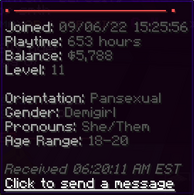
A player's bio is shown when hovering over their name in chat
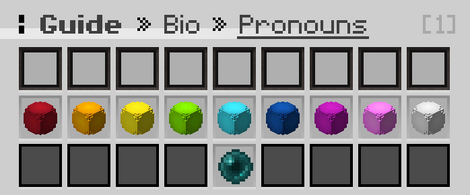
The pronouns page of the bio menu
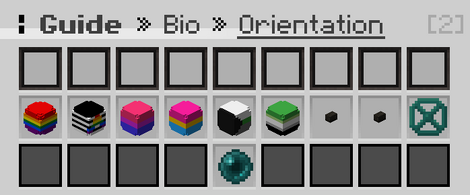
The second page of the orientations menu, showing optional selections
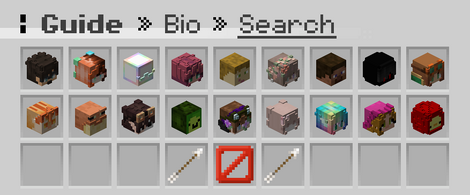
The search function of the bio menu


